What Happens When Your Executor Service Needs a Break?
Explore how Java ExecutorService handles overload with back-pressure, queues, and rejection policies like CallerRunsPolicy.
I was building a file transfer tool that needed to copy thousands of files from a source to a destination. The requirements were clear: maintain robustness, handle failures gracefully, avoid overloading the system with I/O, and verify each copy. My go-to solution was ExecutorService to parallelize the work.
ExecutorService executor = new ThreadPoolExecutor(
    8, 8,                        // core & max threads
    0L, TimeUnit.MILLISECONDS,   // keep-alive (irrelevant here)
    new ArrayBlockingQueue<>(100), // bounded queue
    new ThreadPoolExecutor.CallerRunsPolicy() // rejection handler
);
Eight threads should keep things moving, and a queue of 100 tasks should smooth things out.
Quick Refresher: What Is ExecutorService?
ExecutorService is Java’s framework for running tasks asynchronously using a pool of threads instead of manually creating and managing them. This makes it the go-to tool for parallelism, concurrency, and workload management in Java applications.
When you submit a task, the framework decides:
- Which thread runs it
- Whether it waits in a queue
- What happens if the pool is overloaded
The Problem: When You Submit Too Much, Too Fast
Picture this state:
- 8 threads are actively copying files
- 100 tasks are waiting in the queue
- That’s 108 files already in-flight
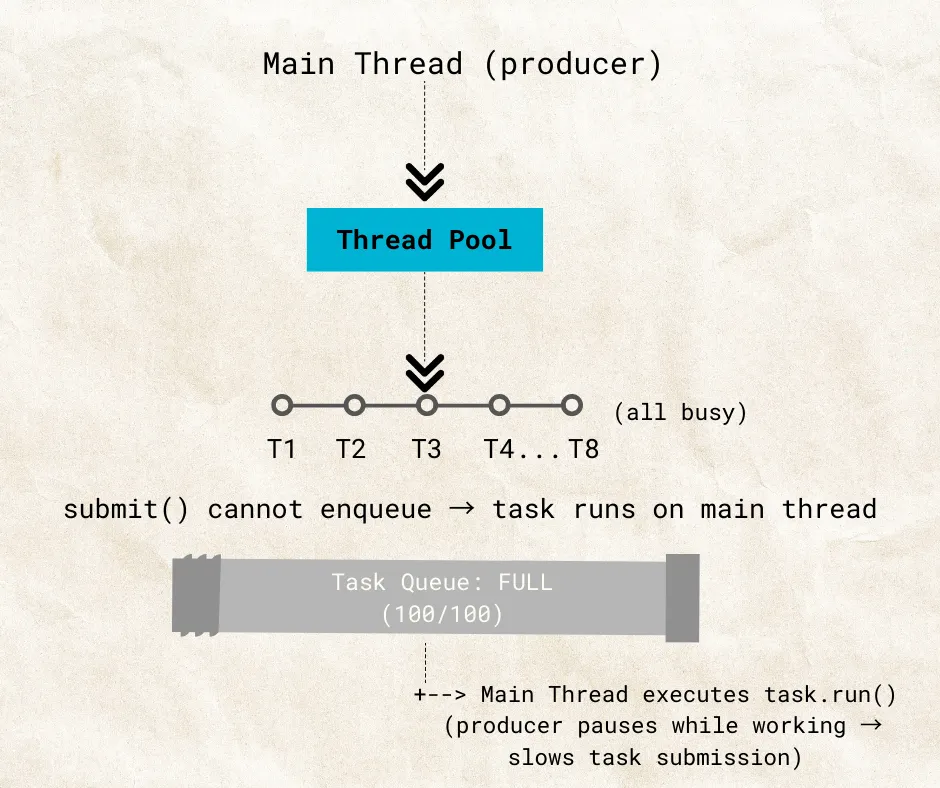
The main thread continues looping through files and calling executor.submit(task). When it reaches the 109th file, the executor cannot accept it — all threads are busy and the queue is full.
At this point, the rejection policy decides what happens next.
When the Executor Service Says: “I Need a Break”
 Overloaded (CallerRunsPolicy)
All threads are busy. The queue is full. Instead of throwing an exception or silently dropping the task, the executor pauses and tells the caller: “You do it.”
The main thread runs the task itself:
executor.submit(task);
// queue full → task.run() executes on main thread
While the main thread executes that task, it no longer submits new ones. Submission is effectively paused until the main thread finishes copying that file.
This forced delay is how CallerRunsPolicy implements back-pressure — by tying up the producer (the main thread), it prevents overload and gives the worker threads and queue time to catch up.
Why This Matters: Back-Pressure
Think of the system in three parts:
- Producer — the main thread submitting tasks
- Consumers — the 8 worker threads
- Buffer — the task queue
When the consumers + buffer are full, the producer is forced to slow down.
Back-pressure ensures the system does not:
- Overload memory with millions of queued tasks
- Flood the I/O subsystem
- Blow up under peak load
It’s not about maximising throughput — it’s about controlling it when the system is saturated.
Trade-offs
CallerRunsPolicy isn’t free. If tasks are long-running (like large file copies), tying up the main thread can become a bottleneck. While it protects memory and I/O, it may increase latency for task submission.
Back-Pressure Is Everywhere
This pattern shows up across the stack:
- TCP uses windowing to slow down senders when receivers are overwhelmed
- Reactive streams (
Flow, Project Reactor, Akka Streams) have built-in back-pressure mechanisms - Just like humans — when we’re swamped, we stop taking on new tasks until we clear our plate
Back-Pressure vs. Manual Throttling
| Approach | Mechanism | Adaptability |
|---|---|---|
| Back-pressure (CallerRuns) | Slows down producer naturally | Adapts dynamically to load |
| Manual throttling | Inserts sleeps/delays in submission loop | Fixed, not load-aware |
Back-pressure is smarter because it adapts dynamically to system load rather than applying a fixed delay regardless of conditions.
Observability
Back-pressure doesn’t eliminate the need for monitoring. Keep an eye on queue size and task completion rate — these tell you when the system is approaching saturation before it tips over.
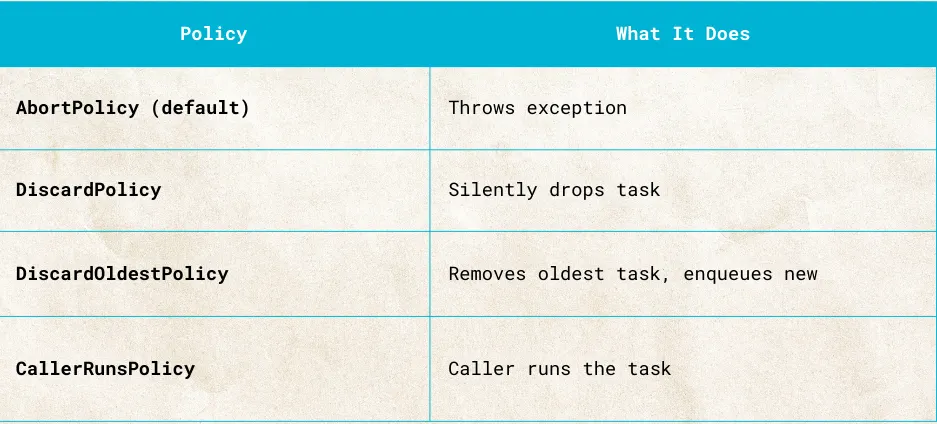
Other Rejection Policies
 Rejection Policies
Thread pools react differently when overwhelmed depending on which rejection policy is in use. Among these, only CallerRunsPolicy creates natural back-pressure. The others either discard tasks or throw exceptions — they protect the executor, but don’t slow the producer.
Summary
The lesson here goes beyond Java. Databases, TCP, Kafka, and reactive streams all apply the same principle: when the system is overwhelmed, the producer must slow down. ExecutorService just gives you a chance to see that idea up close.